Want To Delete Your Facebook Account? It’s Not As Easy As You Think


It’s more difficult than you think to delete your Facebook account, and Mashable’s social media reporter Kurt Wagner says you should think long and hard before clicking delete.
“People who have been on Facebook a long time forget how much information they really have in their profile,” he said. “A lot of it is information that you’d probably want to keep in some way shape or form.”
He recommends downloading a copy of your Facebook data which includes your photos, videos, and posts.
You should also turn off linked apps.
“What Facebook recommends is to reach out to these apps individually and request that they remove any data they’ve collected from you via Facebook”
And deletion is not the same as deactivation.
“Deactivation is kind of a cheaters way of quitting Facebook because in the back of your mind you always know that you can come back and restore your profile in the way that it existed before you jumped off.”
Facebook’s Data Use Policy says it takes about 30 days to delete your account, but some information may remain in backup copies for up to 90 days.

5 Simple Things You Can Do to Improve Your LinkedIn Profile


LinkedIn may seem like the saltine cracker of social media networks when compared to the celeb-saturated Twitter app or your gossipy Facebook feed. But when it comes to real-life payback, it could be just the thing to get you a brand-new, shiny job.
As easy as it is to neglect your LinkedIn profile, you should at the very least do a few basic things to keep it in fighting shape. Otherwise, you risk being passed over for opportunities that you might just be interested in — or even worse, missing out on important professional connections that might be helpful in the future.
Below, five simple ways to spruce up your page: 

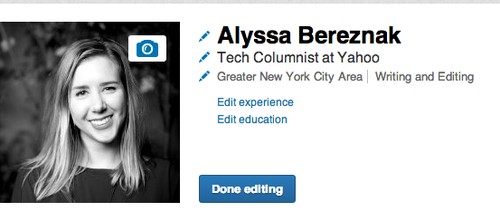
1. Get a profile picture. A good one.No matter how qualified for a position you may be, no employer will be tempted to click on the generic outline of a human head that sits as a default for anyone who hasn’t bothered to upload a photo.
According to Crystal Braswell, manager of corporate communications at LinkedIn, adding a picture of your gorgeous face could result in 14 times more profile views than if you hadn’t. 
Alyssa Bereznak's LinkedIn profile
That being said, any old image won’t do. Don’t use a selfie, or anything shot using a cheap camera. And try to avoid the pixelated, obviously-cropped-out-of-a-group-photo portrait that’s so unfortunately common on Facebook. Choose a high-resolution image that’s just you, in a relatively conservative outfit, looking happy. Because people like working with other happy people.
If you don’t have a photo like this, ask a friend to take one. Some surveys have indicated that, for a sizable percentage of recruiters, it’s sometimes the only thing they look at.

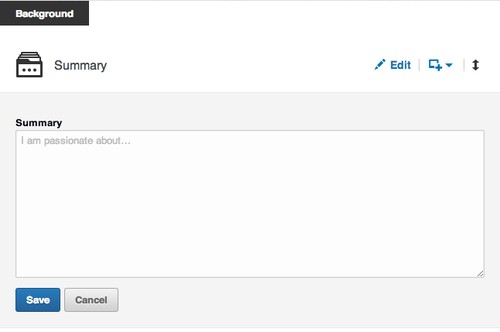
2. Write a summary.You may loathe writing self-summaries, but on LinkedIn, these little paragraphs can be particularly helpful for optimizing your searchability, according to Braswell. In other words, if a recruiter types in “advanced Swahili speaker” and it matches the keywords you put in your profile, you’ll automatically pop up on her results page. 
LinkedIn CEO Jeff Weiner concurs. “Your experiences, your skills, your ambitions, what it is you ultimately want to accomplish — that’s increasingly how people are finding you,” he told The New York Times’ Thomas Friedman in a recent interview. “For the vast majority of folks, when someone searches your name on a major search engine, your LinkedIn profile is showing up at or near the top of those results.” 
image
Don’t just reiterate the experience you’ve listed in each job. Use the summary, which should be at least 40 words to seem substantial, as a chance to make you seem like a well-rounded adult human and not some piece of recruiter meat. Braswell recommends discussing your life passions, interests, and goals.

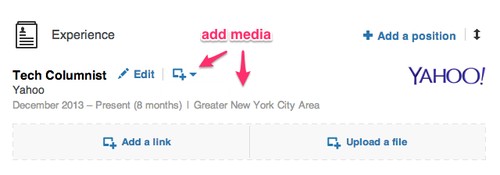
3. Add pretty graphics and videos.There’s a simple button that allows you to add some pizzazz to your otherwise-vanilla LinkedIn profile. Below your summary and each position, you have the option to add a link or a file. This is an opportunity to link to something awesome you worked on and load it into the site for everyone to see. You can also add videos, keynote presentations, or PDFs of research projects or papers.
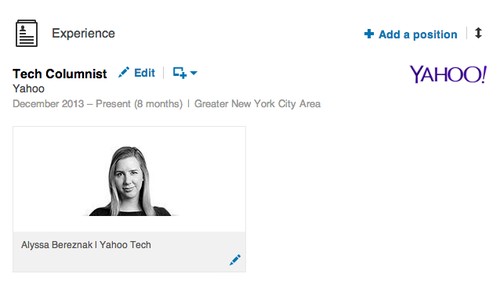
For instance, I added a link to my Yahoo Tech author page under my position, so anyone can browse my work.
image
And now it looks like this:
image
As Weiner told The New York Times, “the LinkedIn profile is now essentially your LinkedIn portfolio. Take a general contractor who previously would’ve been describing the dream house they just built. Now they can upload imagery or video.”
This feature is especially helpful if you happen to be in a creative industry that values your artistic or design skills. “Rich media becomes another way to visually differentiate yourself and show people exactly what you’re capable of,” Braswell told Yahoo Tech. “It presents a 3D view of you as a professional versus a two-dimensional view.”

4. Tell the world what a good person you are.In a survey conducted by LinkedIn, 42 percent of hiring managers said that they felt volunteer experience was pretty much the same as work experience. So if you’ve been helping design fliers for a friend’s nonprofit, or spending weekends at your local homeless shelter, make sure to mention it. The rest of us will find it in our hearts to forgive you for your humble bragging. 

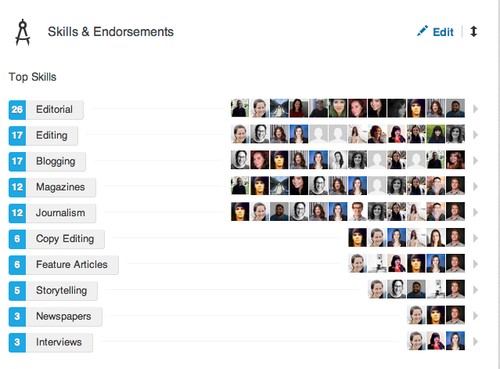
5. Endorse to be endorsed.Whether you think it’s just meaningless back-patting or not, having endorsements for certain skills on your profile makes you look impressive. “They are an additional signal that reaffirms your skills and areas of expertise for anyone viewing your profile,” Braswell said. Just look at this pyramid of stuff that it looks like I can do! (I’m actually illiterate). 
image
So if you have a past or present co-worker whom you respect and want to show some love, just take a moment to visit his profile. Usually there’ll be a button that encourages you to endorse him for something, anything. Odds are he’ll return the favor. At the very least, it’ll make your profile look fuller and more complete.

IP Camera Viewer 2.0 Final


IP Camera Viewer allows you to view live video from your USB or IP cameras on your PC. Use any USB or IP camera to keep an eye on your home, office, parking area or anywhere you need security. View video from multiple IP cameras directly to your computer. Currently more than 1500 different IP camera models from leading camera manufactures are supported. It includes Axis, Canon, D-Link, Foscam, Panasonic, Mobotix, Pixord, Sony, Toshiba, Vivotek and many more. You can send a request to our technical team if your camera or model is not listed in our application. Virtually all USB cameras work with IP Camera Viewer.

You can control and view up to 4 camera feeds simultaneously. Get a live preview from multiple cameras with this light-weight application. IP Camera Viewer's centralized camera and layout management allows you to view your cameras from multiple remote locations on a single screen. You can change the arrangement and preview layout of the cameras, for your security needs


key features

Live Previewing
· Control and view up to 4 camera feeds simultaneously.
· Use IP cameras as well as USB cams.
· Support for 1500 camera and counting.

Camera Configuration
· Digitally zoom, even if your camera does not support it.
· Pan/Tilt/Zoom (PTZ) support for many network cameras.
· Adjust the orientation of live feeds.

Advanced Camera Function Integration
· Adjust image settings for IP camera.
· Independently configure video and image properties for USB camera.
· Backup and Restore cameras with individual settings. 
http://download.cnet.com/IP-Camera-Viewer/3001-2348_4-75609217.html?hlndr=1

IObit Advanced System Care 7 Pro With Licence Key

What does Advanced SystemCare 7 do?
* Boosts your slow PC to 200% faster
* Protects PC in real time from malware, spyware and malicious attack
* Provides over 20 smart tools, such as Driver Booster, Program Deactivator and Homepage Protection
* Fully supports Windows 8 and IE 11

Screen :-

1) Install ASC Set-up :-

image

2) Then Click On Activate Now :-

image

3) Enter The Licence Key :-

image

4) Its Ready to Enjoy :-

image


http://www.iobit.com/downloadcenter.php?product=asc7share
key
C5381-80DD2-B0C44-CD9B4

Google's Project Zero to Scan Web for Security Flaws

 
Fear not, citizen: Google is looking out for you. 
Today (July 15) Google announced Project Zero, an in-house team of security researchers dedicated to finding flaws in non-Google software "across the Internet." Google says Project Zero will let the company more directly address zero-day flaws (newly discovered bugs) and other security issues in third-party software that affect Google users and Google products.
Among the members of Project Zero is George Hotz, a.k.a GeoHot, who was the first to carrier-unlock an iPhone in 2007 when he was 17, showed other how to hack a PlayStation 3 in 2010 (Sony sued him) and more recently found a Chrome OS exploit for which Google gave him a $150,000 reward -- and a job.
"Our objective is to significantly reduce the number of people harmed by targeted attacks," said Google security expert (and newly minted head of Project Zero) Chris Evans in a blog post. "We're hiring the best practically-minded security researchers and contributing 100 percent of their time toward improving security across the Internet." 
Google says it created Project Zero to improve Internet security for all Internet users. Others in the security industry are a bit more skeptical.
"Google's Project Zero amounts to little more than a PR stunt," said Aaron Portnoy, vice president of Exodus Intelligence, a security company that specializes in discovering zero-day vulnerabilities and disclosing them only to its clients.
"Bug-bounty programs, such as HP's Zero Day Initiative, have upwards of 1,500 researchers submitting vulnerability reports to their program," Portnoy told Tom's Guide, referring to funds that pay rewards to the finders of software flaws.
Portnoy, who once ran the Zero Day Initiative, pointed out that Google isn't the first major corporation to create an in-house team of researchers focused on finding flaws in software other than its own.
"Google adding 10 more researchers to the mix isn't really going to affect our business," he said.
Chaouki Bekrar of VUPEN, a French company that finds and sells zero-day security flaws, also weighed in.
"What Google did not understand is that killing a few zero-days will make Google's researchers/shareholders feel better but it will definitely not kill the market of zero-day exploits, instead it will make it even more lucrative," he told Tom's Guide.  
Evans says Project Zero's researchers will first report any flaws they find directly to the affected software's developers. Once the report becomes public (which Evans says is "typically once a patch is available") the bug will be filed in a public database (found here), where people can see how much time passed between a bug's reporting and its patching.
"We also commit to sending bug reports to vendors in as close to real-time as possible, and to working with them to get fixes to users in a reasonable time," Evans added. 
The other members of Project Zero include Ben Hawkes, Tavis Ormandy and Ian Beer, well-regarded Google employees with multiple bug discoveries to their names.

Google researchers have been finding security bugs in non-Google products for several years. Often, when researchers find a security flaw and report it to the company in question, the company will pay the researchers a "bug bounty" for their trouble — as Google did for Hotz's Chrome OS bug.
Some freelance researchers depend on these bug bounties for income. Project Zero's salaried researchers (and they're hiring, according to Evans) may cut into their business.

Windows 9 'Threshold' preview coming this fall


the next version of Windows, code named "Threshold," is expected to debut some time in 2015 but we'll get a preview this fall according to sources speaking with ZDNet.
Windows 8.1 focused on improving the desktop experience and Windows Threshold will continue the trend. Threshold will adapt to the type of hardware you're using. If it senses a mouse and keyboard, it will boot to the desktop by default. If you have a touch screen, it will boot to the live-tile interface.
Windows 8.1 already allows users to choose to boot to desktop by default, but Windows Threshold will automate the process.
We also saw a preview of the revised Start Menu coming to Threshold. It's a hybrid of the transitional Windows 7 Start Menu and Windows 8 live-tile interface.
Microsoft is also planning Windows 8.1 Update 2, which will provide minor usability improvements. This update is expected to roll out this August with a bunch of security updates.
There is still uncertainty whether Threshold will be an entirely new version of Windows or if it will be a point update. Microsoft may want to brand Threshold as Windows 9 to tempt users still clinging onto Windows 7. We've already seen evidence it will be named Windows 9 from a leaked image.

Create animated GIFs from YouTube videos


The popularity of animated GIFs still hasn't let up, and one of the easiest ways to create your own animated GIF is by using YouTube videos and free online GIF converters.
When it comes to creating GIFs from your own video clips, Softonic Editor Jan-Hendrik already took us through the process of creating your own GIFs on both Mac and PC using web apps or a webcam to record things live. If you're already found the perfect video online, however, there's an even easier way to make your own GIFs. With any one of the three online converters below, you can create your very own animated GIFs from a YouTube video.

Gifsoup

With Gifsoup, you simply copy any YouTube link into the text box, and then click Create Gifs.
Then, you can use any section of the video up to ten seconds. Select the section by picking a start and end time within the clip. Then, click on Generate Animated GIF to create the GIF file.
There aren't any other options, so creating the GIF is incredibly easy. The only downside: Gifsoup adds its own watermark to your creation. With a paid premium account, you can create animated GIFs that are up to 30 seconds long with no watermark.

MakeaGIF

MakeaGIF works on the same principle as Gifsoup, but offers a slightly fancier interface. A slider lets you select the start time and specify the desired duration of your GIF animation. If you register for free, the maximum playing time is 10 seconds. Otherwise, you have a limit of 5 seconds.
Unlike Gifsoup, MakeaGIF displayed no watermark and creates longer animated GIFs, although the web app works much slower.

IMGflip

A more comfortable online converter for YouTube videos is IMGflip. Like MakeaGIF, this service offers free access, as well as premium access for an additional charge. The free version will generate 10 second GIFs with dimensions of 260 or 360 pixels with watermark, with the option of making 100x100 square images as well.
Especially practical about IMGflip is that before making your GIF, you can set the expected frame rate and file size You also have the option of adding small text messages at any point in the animated GIF. The paid version (IMGflip Pro) creates clips of any resolution and up to 40 seconds long, without watermark.
While there may be a ton of GIF websites out there, sometimes it's still impossible to find what you're looking for, and with these three services, you can create GIFs that perfectly express your emotion.

Windows 8.1 24IN1 AIO x64-Bit English

 
image

image

image

============
Description
============

Windows 8.1 24IN1 AIO x64-Bit English-US Pre-Activated [DaRT 8.1 Updated June-25-2014 v2]

*No Windows 8.1 Settings were harmed in the making of this ISO.
*No Programs are added to Windows.
*No Registry Settings were modified.
*No Unattended Settings were added to the ISO.

These RTM Sources are the final Build 9600

Installation Indexes:
Windows 8.1 (Core) / KMS-Activated
Windows 8.1 (Core) N / KMS-Activated
Windows 8.1 (Core) Single Language / KMS-Activated
Windows 8.1 Pro / KMS-Activated
Windows 8.1 Pro N / KMS-Activated
Windows 8.1 Pro VL / KMS-Activated
Windows 8.1 Pro N VL / KMS-Activated
Windows 8.1 Pro WMC / KMS-Activated
Windows 8.1 Enterprise / KMS-Activated
Windows 8.1 Enterprise N / KMS-Activated
Windows Embedded 8.1 Industry Pro / KMS-Activated
Windows Embedded 8.1 Industry Enterprise / KMS-Activated


Language: en-US (English - United States)

SetupComplete.cmd phase (Pre-Activated indexes only):
Defender exclusion key for AutoKMS
Warning.vbs short 8s non-genuine notification
AutoKMS activation

Features:
-NetFx 4.5.2
-Windows 8.1 with Update MSDN/ESD download
-Highly compressed ESD format.
-DaRT 8.1 integrated into boot.wim recovery options.
-UEFI bootdata in addition to BIOS bootdata
-Diskpart/apply script with recovery image and multi-boot support v1.2.4*
*To access, press shift-f10 during boot-setup and type: MENU


Notes:
-EI.CFG is present. *You will need to extract the iso and delete this
file to upgrade from a previous version of Windows*. You will also want to
allow setup to download updates during upgrade process.

**NOTE**
-Please tell me if this version fixes your issues with installs on x64
platforms. I've tested all indexes personally without any problems, but
I have limited hardware to test on. This feedback is important.


Changes:
v2
-Re-examined winre optional dart stuff and I've restored the stock
Winre.wim from each index so that none of the file attributes or
ACL permissions are modified in any way. Perhaps this will help
solve the rare boot-install error.
-There is a weird connection with dism and file attributes and properties.
It's hard to explain, but during my early testing with winre stuff, I
noticed that improper file attributes would make a mount folder unable to
unmount. It could be as simple as not deleting files that were previously
differently attributed, or it could be indicative of a larger problem.

v1
-Removed sxs folder. Use the online script in the scripts folder to add
netfx 2-3.5.1 - The sxs folder only adds build 9600 base. The online
version adds the additional files to bring it up to 9600.17031. It should
also add any necessary language information for the feature.
-AutoCRC on the ISO to standardize to crc32: FFFFFFFF
-Added Embedded 8.1 Industry Pro and Enterprise*
*These Embedded versions are the same as their Pro VL or Enterprise
counterparts except that they do not have any APPX modern apps installed
and they have an iSKU feature package and gVLK installed by default.
-Added KB2969339 new servicing stack update to all boot/winre/install
images and upped the scratchspace to 256megs from the default 32megs.
The extra scratchspace just uses a little more ram for the ramdrive so
you can store things on the X: ram drive during winre or boot.

http://kickass.to/torrents/windows-8-1-24in1-aio-x64-bit-english-us-pre-activated-dart-8-1-updated-june-25-2014-v2-t9314083/

Germany beats Argentina 1-0 in extra time to win World Cup


Call them World Cup champions.
Mario Goetze scored in the 113th minute Sunday night, and the 1-0 victory gave Germany its fourth World Cup title – and second at the expense of Argentina. It’s the first time a European team has won the World Cup in either North or South America.
When the final whistle sounded, the bench players raced onto the field, joining their teammates in a dogpile. Chancellor Angela Merkel, who made her second trip to the World Cup to see the final, stood and applauded.
As the German players partied, Goetze appeared to wipe a tear from his eyes.
Lionel Messi, meanwhile, could only stand and watch, hands on his hips and brushing off any attempts to console him. This was his time to win the one title that’s eluded him, and his performance Sunday will do nothing to quiet the critics – talking to you, Pele – who say he’ll never be in the conversation for best player of all time without a World Cup title.
Messi disappeared for large stretches of the game, and whiffed on what is normally a gimme for him. With the ball on his left foot and German goalkeeper Manuel Neuer frozen, Messi took a shot from about 9 yards. But he mis-hit it just a tad, and it missed by inches at the far post.
He also skied a free kick in the final stoppage time, and had a shot cleared off the line in the first half.
But he isn’t the only Argentina player to blame for this loss.
Though Germany came in seeming to be the better team, Argentina had more chances. Gonzalo Higuain missed a golden opportunity in the 21st after Toni Kroos’ dismal backheader, shanking a shot from 18 yards.
It was so bad Higuain didn’t even need to watch it go wide, bending over and putting his hands on his knees as Javier Mascherano clutched his head.
And Rodrigo Palacio botched what looked like an easy chip shot in the 97th.
As much as Messi has been criticized for his World Cup futility, so had Germany. Though it had made the semifinals in both 2006 and 2010, this team – perhaps its best since 1990 – had yet to win a major title.
In fact, it had only made the final at one major tournament, losing to Spain at the 2008 European championship.
But the Germans were brimming with confidence ahead of this game, saying they fully expected to win it. Even if they needed extra time to do it.
(Reuters)
That 90 minutes weren’t enough to settle this final, the third between Germany and Argentina, was only fitting. This was the mother of all grudge matches even before it began, with Argentina beating Germany for its second title in 1986 and Germany – led by a guy named Jurgen Klinsmann — getting payback four years later.
As if that wasn’t enough, Germany had eliminated the Albiceleste at the last two World Cups. It beat them in a penalty shootout in 2006, then routed them 4-0 in South Africa to bring an embarrassing close to Diego Maradona’s coaching career.
Argentina fans were thrilled to see their team back in the finals for the first time since 1990 – and only too happy to rub a little salt in Brazil’s deep wound. Though FIFA said Germany and Argentina each received 13,000 tickets for fans, the stadium looked – and sounded – more like a game in Buenos Aires.
Wearing Argentina’s trademark blue-and-white striped shirt, they sang and cheered and bounced up and down, waving jerseys and flags and scarves.
But despite Brazil losing its last two games by an AYSO-like combined score of 10-1, the home fans got the last laugh – sort of – with the German victory.

4 things you should never share on social media


Some info should never be shared on places like Facebook, Twitter or even Foursquare, and despite privacy settings that you can generally alter, there are still things you should avoid sharing altogether.
On Facebook, although many users leave their profiles open, you can control everything you publish throughout its privacy settings. On Foursquare, it's up to you whether you prefer to share your check-ins only with friends or with the whole community, and on Twitter, everything is public unless you choose private settings (typically uncommon for the platform), or unless you send a private message to someone you mutually follow.
So, what are 4 things you should never share on any of these social networks?

1. 'A two-month holiday in Indonesia, awesome!'

When you go on vacation for weeks, choose what you want to share and how. A public tweet is perhaps not the best way to share this information with your friends. By checking the geotags of your tweets or by simply going on your Foursquare account, burglars could decide to make an impromptu visit to your home during your absence.
Indonésie Twitter
In the past, some sites like PleaseRobMe.com have tried to alert the public about this issue.
In the same way that someone can check if you really are sick when you take time off work, it's also smart to avoid the beach selfie; it may not be quite as dangerous, but it could get you in trouble, or even worse, make your colleagues super jealous.

2. Beware of misleading content

If you see a video like 'OMG Miley Cyrus out of control' or 'Britney Spears as you've never seen her before' on someone's wall that would otherwise never post something like this, you know there's trouble.
Rihanna video
These scams were discovered a long time ago but still cause problems for people. When clicked, these 'video clips' actually make you 'Like' the content (which is sometimes questionable) and then adds the 'Like' to your own wall or news feed. Avoid clicking weird or suspicious things you don't think your friends would actually 'Like'.
Also, don’t forget that recruiters don’t hesitate to examine your Facebook and Twitter profiles before even considering you for an interview. It’s not about having a completely clean Facebook –this social network is, at the end of the day, a space for expression– but it might be a good idea to filter what you 'Like'.
Dressing up as an apple and chasing fat people

3. Never talk about confidential information

To mention a contract or agreement on the internet might seem innocent enough, but if said agreement contains confidentiality clauses, it's probably not a good idea to talk about them on social networks.
One father learned this lesson the hard way after losing $80,000 in a settlement case in which a confidentiality clause stipulated that no one other than his wife and attorneys could discuss the settlement. Unfortunately, his daughter didn't get the memo and posted the info all over Facebook, losing the family the settlement.

4. Don't complain about colleagues

If your line manager or your clients drive you crazy, don’t release your frustration on social networks. There are countless cases of people who were politely excused from their duties after making outrageous remarks on Facebook. It’s estimated that a significant proportion of layoffs are caused by social network misuse.

Known your privacy settings

To avoid unpleasant surprises, the simplest –and most effective– thing to do is to understand the privacy settings of these services. The goal is not to use your Facebook page or an impersonal Twitter account less, but rather to present yourself in a more favorable light.

Top 10 naval battle games for PC


The highly anticipated MMO World of Warships, from the same developers as World of Warplanes and World of Tanks, is now in closed alpha with a release date that's TBA. Still, that doesn't mean there aren't already a ton of great naval battle games that you can play in the meantime.
As somewhat of a niche genre, there are plenty of games that either focus solely on naval battles, or have a great naval element to them. Whether you'll have to manage your fleet of aircraft and battleships to beat your enemy, defend your base, ports, and fleet, or launch raids to cut off naval routes and invade enemy territory, there are naval battle games for every scenario. Below are some of the best naval battle games for PC, taking you from WWII to the 17th Century high seas, and everywhere in between.

1. BattleStations Midway

One of the classic games in the genre, BattleStations Midway is a strategy game that takes place in the Pacific Ocean circa WWII. Using real-time tactics, you can control each individual ship or plane in your entire fleet, with the hope of defeating your enemy. While BattleStations Midway may be an older game, it still has decent graphics, offers both single and multiplayer mode, and is truly a staple in the genre.
BattleStations Midway

2. BattleStations Pacific

The sequel to BattleStations Midway, BattleStations Pacific expands on the previous title by adding new features including new weapons and ships, different kinds of combat–namely, more advanced submarine battles– and the ability to play either a US or Japanese campaign. It also has 5 extra multiplayer modes, including Island Capture, Duel, Competitive, Siege and Escort.
Battlestations Pacific

3. Silent Hunter IV: Wolves of the Pacific

If submarine warfare is more to your taste, try Silent Hunter IV: Wolves of the Pacific, a game from Ubisoft that also takes place in the Pacific during WWII. The submarine simulator uses really intricate graphics to literally immerse you in the depths of the Pacific Ocean, with everything from launching torpedo attacks, to using radar and sonar, to managing your crew. Different game modes make it easy for both beginners and more advanced players to master the game.
Silent Hunter IV

4. Battlefield 4 Naval Strike (expansion pack)

The Naval Strike expansion pack for Battlefield 4 brings naval warfare to the 21st century. Taking place in the South China Sea, the DLC pack brings multiplayer maps, new gadgets and weapons, and most importantly, a hovercraft. In the new Carrier Assault mode, you'll be battling to sink the enemy's aircraft carriers.
Get Flash Player

5. Naval War: Arctic Circle

Travel a bit further north in Naval War: Arctic Circle, a real-time naval strategy game that, unlike some of the previous games, takes place in the distant future during a fictional war. The game has everything from submarines, aircrafts, and helicopters, to in-air refueling tankers and onshore airbases. With navies from many different countries, including the UK and Scandinavian countries, the game offers both single and multiplayer modes.
Naval War Arctic Circle

6. War Thunder

It's still in beta, but War Thunder is a great option which, although doesn't exclusively contain naval battles, definitely has some great naval content. The focus is on flight, but air combat is not complete without naval battles. You can experience naval warfare in War Thunder with aircraft carriers, warships and naval aviation units. For a free game that still in beta, it's a great option.
War Thunder

7. Empire: Total War

Another complete war game, Empire: Total War is a turn-based, real-time strategy game that takes you back to the 18th century, where you can recreate some of the most well-known historical battles of the early modern period. The real-time naval battles in Empire were a first for the Total War series, letting you fire cannons and engage in on-board combat in both single and multiplayer modes.
Empire Total War

8. Assassin's Creed IV: Black Flag

It may not be a traditional naval war game, but the latest installment of Assassin's Creed takes you to the high seas in the Golden Age of pirates. Aboard the Jackdaw, you'll be able to navigate the seas, firing cannons and weapons at enemies, overtaking Spanish galleons, and customizing your ship to take part in some epic sea battles.
Get Flash Player

9. Voyage Century Online

Less naval battle than naval exploration, Voyage Century Online is a nautical-themed MMPORG set in the 16th century. Ships are your primary method of travel, and you can pick up skills in sea battle, navigation, and even shipbuilding. If faring the high seas is what you're looking for, you can choose to become either a Royal Military Officer or a Caribbean Pirate, perfecting your short and long-range cannon attacks.
Voyage Century Online

10. Windward

If you're a fan of 17th century ships but prefer a bit more naval action, try Windward, an online game from developers Tasharen. In Windward, you play in teams of four, using your ships to take over as many structures as you can on the map. It's not as graphically advanced as some of the naval battle games on the list, but for a browser game, its still pretty impressive.
Windward
So, while some of these games may not be limited to naval battles, they all offer great naval battle elements in various forms with different levels of graphics for anyone who wants some simulation naval action.

How to delete Google search results


In mid-May 2014, the European Court of Justice ruled that internet users have the right to be forgotten. This means that search engine providers such as Google are obliged to make it possible to delete references on web pages containing sensitive and personal data.

To ask for a Google search result to be deleted, you have to fill out an online form. Here, I'll go through the checklist to make sure that you know exactly what to look out for when making your request.

Apply for the deletion of search results here.
It depends on the individual case

In the intro to its search removal request form, Google stresses that, for each request, decisions are made on a case-by-case basis and subject to certain conditions. The search results must meet the following requirements:
Search results must include the name of the person affected.
The results must be inconsistent with the purposes for which they were originally intended, or
Must not be relevant for these purposes or go beyond them
In each individual decision, the time elapsed since publication is particularly taken into account.

In making a decision, Google weighs the privacy rights of the individual against the rights of the general public. The removal of search results is only possible for citizens of the European Union.
Prohibited Cases

The removal of search results is prohibited in some cases. These include, amongs others:
Financial fraud
Professional misconduct
Abuse of authority
Criminal convictions
The public behavior of government officials
What you need for the application

As well as a digital copy of a valid photo ID in PDF or JPG format, you also need to send the relevant internet address (URL) with your application. You must also state why you want the result to be removed. There are three justifications that you need to expand on in an additional field:
The search result is irrelevant
The search result is outdated
The search result is otherwise inappropriate

In cases that aren't obvious, you must also explain why the URL specifically refers to you. For example, why, if your name is not explicitly stated on the page, are you still being personally addressed.
How to request removal from search results

Step 1: Find affected URL

If you've checked that your URL fulfills the requirements for deletion, you'll first need the web address in question.


If you click on a search result, you'll find the URL in your browser's address bar. Cope the URL to the clipboard using Ctrl + C.

Step 2: Fill in all fields.

Now, fill in all mandatory fields in Google's online form. Paste the copied URL with Ctrl + V in the box provided. You can provide more than one URL.


In the next field, you have to explain why you want to remove the URL.

Step 3: Upload identity document

When you have inserted all the URLs and provided a justification for each search result explaining why this particular site infringed your personal data protection rights, you then need to upload a copy of your ID. You'll need to scan your ID beforehand and save it as a PDF or JPG file on your computer.


To upload, click the Browse button and select the file with the copy of your ID.

Step 4: Confirm the details and sign application

Before sending the request to Google, you must first confirm that you have entered all the information legally. This also means that you are the affected person or have been instructed by the affected person to submit the application.


As a last step, you have to add a digital signature to the document. To do this, enter the current date and confirm your name and the accuracy of the information one last time.


Once you've submitted your application, you'll have to wait until Google contacts to see whether or not your data will be removed.