Best free translation apps for iOS, Android and Windows Phone


We scour the world of translation apps to bring you the best on every mobile platform
If you're looking for a free translation app for your smartphone or tablet, you're likely to be overwhelmed by the number available.
So rather than leaving you struggling with your French and confused over your Polish, PC Pro has waded through the apps on iPhone, Android and Windows Phone to pick out the best free translation apps.

Best free translation app for accuracy

Google Translate: Android, iOS and Windows Phone
Google Translate Arabic
When it comes to accuracy, Google Translate is still the best free tool around, whether online or as an app. While it struggles with longer, more complicated sentences, for quick phrase or word checks, it still beats all the other apps tested.
Google Translat Turkish
It is also the most comprehensive of all the apps we tested; there wasn't a single language it didn't recognise or couldn't translate.

Best free translation app for voice recognition

Speak&Translate: iOS
Speak&Translate
Speak&Translate is a great for speech recognition and translation.
Select your two languages from a sidebar, tap the flag of the language you speak and say whatever it is you want translated. The app will then show on the screen what it heard you say and read out a translation, which it also displays on screen.
One of the major benefits of this translation app is the ability to choose between different dialects of the same language - there are four versions of English available, and two each of French, Spanish, and Portuguese.
Speak&Translate
This is particularly useful for us Brits, as US-only English often gets confused by our plummy accents.
This app beat all the others when it comes to voice recognition. It easily understood our test sentences, but when it did interpret us incorrectly the first time, a second attempt was normally all it took to set it straight.
Speak&Translate
Er, not quite...
Speak&Translate bread
Much better
The UI is also aesthetically pleasing and easy to use.
The only serious limitation is the range of languages - we couldn't test any of the Indian languages - and the voice is very robotic. Bizarrely, it also lists Afrikaans as "African".
Speak&Translate also struggled with longer, more complex sentences. However, for simple "phrasebook" style translations it can't be faulted and the accuracy of the translation was extremely high - even the phrases it heard incorrectly first time were quickly translated properly.

Best free translation app all-rounder

Bing Translator: Windows Phone
Bing Translator voice recognition
Bing Translator was far and away the best all-in-one free translation app we tried - it's disappointing that it's only available on Windows Phone.
The app takes phrases for translation via the keyboard, camera and voice recognition, and offline packs can be downloaded and accessed when you've got no internet connection - handy for when you're traveling.
Also, while not as comprehensive as Google Translate's list of languages, it has a solid selection available, with a good geographical range.
Bing Translator history
We found the camera function particularly cool, although you do have to make sure you have the words lined up correctly to get a translation that makes sense.
Bing translator Camera
Bing Translator Camera
While it's great to have an app that is so comprehensive, including offline functionality, our one complaint would be the voice recognition aspect is limited to four continental European languages, plus US and UK English.

Best free translation app for shortcuts

Translate Pro: iOS
Translate Pro Finnish
Translate Pro is an easy-to- use app that can, like the other apps reviewed here, be used for on-the-fly translation, but also features a phrasebook-style menu down the left-hand side.
Categories include bargaining, ordering food and drink, travel, and even romance - although we can't help thinking whipping out your iPhone before asking "may I kiss you?" might break the mood a bit.
Translate Pro phrasebook menu
It's also easy to choose between any of the 50 languages available, and to switch backward and forward between the selected ones.
Translate Pro Arabic and Language selection
The two main drawbacks of the app are only 11 of the languages in Translate Pro's database are included in "phrasebook" format, and that the number of characters you can enter is limited. This can leave you with truncated sentences or words ("Neth" should be "Netherlands"), or mess with the grammar of some languages a bit if you decide to break the sentence in two.
Translate Pro Arabic cut off

Translation apps: the blooper reel

Google Translate gone wrong
No translation app is going to be 100% flawless, even if it is generally very good.
Under Translate Pro, our comment to our Finnish co-tester that North Korea was reportedly claiming to have won the World Cup was "mental" was translated as "spiritual", while thanks to Google Translate we told our Turkish co-tester someone had a court date, rather than a “trial” in the sense of “testing out”.
And, with all the apps we tested as well as most online translation tools, you do often get a "gist" translation, rather than a grammatically perfect one - especially with longer sentences. But considering how garbled machine translation used to come out, it’s a testament to technology that these were the only howlers.

How we tested the best free translation apps

PC Pro tested a range of apps on iOS, Android and Windows Phone with a native UK English speaker talking (and typing) to native Arabic, Finnish, French, Hindi, Kannada, Spanish, Tamil, Telugu and Turkish speakers.
We chose these languages to make sure there was a good range of writing systems and grammars tested, not only western European languages.
All apps were tested in all nine languages, providing the target language was available, in order to provide a level playing field and find the ones we think work best.

Want To Delete Your Facebook Account? It’s Not As Easy As You Think


It’s more difficult than you think to delete your Facebook account, and Mashable’s social media reporter Kurt Wagner says you should think long and hard before clicking delete.
“People who have been on Facebook a long time forget how much information they really have in their profile,” he said. “A lot of it is information that you’d probably want to keep in some way shape or form.”
He recommends downloading a copy of your Facebook data which includes your photos, videos, and posts.
You should also turn off linked apps.
“What Facebook recommends is to reach out to these apps individually and request that they remove any data they’ve collected from you via Facebook”
And deletion is not the same as deactivation.
“Deactivation is kind of a cheaters way of quitting Facebook because in the back of your mind you always know that you can come back and restore your profile in the way that it existed before you jumped off.”
Facebook’s Data Use Policy says it takes about 30 days to delete your account, but some information may remain in backup copies for up to 90 days.

5 Simple Things You Can Do to Improve Your LinkedIn Profile


LinkedIn may seem like the saltine cracker of social media networks when compared to the celeb-saturated Twitter app or your gossipy Facebook feed. But when it comes to real-life payback, it could be just the thing to get you a brand-new, shiny job.
As easy as it is to neglect your LinkedIn profile, you should at the very least do a few basic things to keep it in fighting shape. Otherwise, you risk being passed over for opportunities that you might just be interested in — or even worse, missing out on important professional connections that might be helpful in the future.
Below, five simple ways to spruce up your page: 

1. Get a profile picture. A good one.No matter how qualified for a position you may be, no employer will be tempted to click on the generic outline of a human head that sits as a default for anyone who hasn’t bothered to upload a photo.
According to Crystal Braswell, manager of corporate communications at LinkedIn, adding a picture of your gorgeous face could result in 14 times more profile views than if you hadn’t. 
Alyssa Bereznak's LinkedIn profile
That being said, any old image won’t do. Don’t use a selfie, or anything shot using a cheap camera. And try to avoid the pixelated, obviously-cropped-out-of-a-group-photo portrait that’s so unfortunately common on Facebook. Choose a high-resolution image that’s just you, in a relatively conservative outfit, looking happy. Because people like working with other happy people.
If you don’t have a photo like this, ask a friend to take one. Some surveys have indicated that, for a sizable percentage of recruiters, it’s sometimes the only thing they look at.

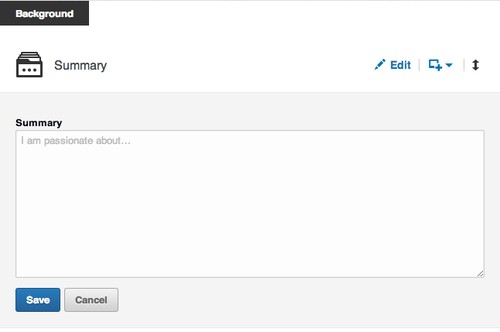
2. Write a summary.You may loathe writing self-summaries, but on LinkedIn, these little paragraphs can be particularly helpful for optimizing your searchability, according to Braswell. In other words, if a recruiter types in “advanced Swahili speaker” and it matches the keywords you put in your profile, you’ll automatically pop up on her results page. 
LinkedIn CEO Jeff Weiner concurs. “Your experiences, your skills, your ambitions, what it is you ultimately want to accomplish — that’s increasingly how people are finding you,” he told The New York Times’ Thomas Friedman in a recent interview. “For the vast majority of folks, when someone searches your name on a major search engine, your LinkedIn profile is showing up at or near the top of those results.” 
image
Don’t just reiterate the experience you’ve listed in each job. Use the summary, which should be at least 40 words to seem substantial, as a chance to make you seem like a well-rounded adult human and not some piece of recruiter meat. Braswell recommends discussing your life passions, interests, and goals.

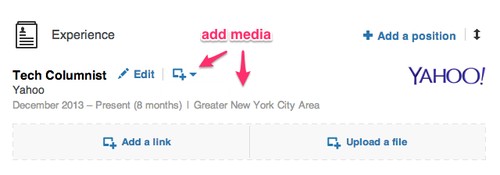
3. Add pretty graphics and videos.There’s a simple button that allows you to add some pizzazz to your otherwise-vanilla LinkedIn profile. Below your summary and each position, you have the option to add a link or a file. This is an opportunity to link to something awesome you worked on and load it into the site for everyone to see. You can also add videos, keynote presentations, or PDFs of research projects or papers.
For instance, I added a link to my Yahoo Tech author page under my position, so anyone can browse my work.
image
And now it looks like this:
image
As Weiner told The New York Times, “the LinkedIn profile is now essentially your LinkedIn portfolio. Take a general contractor who previously would’ve been describing the dream house they just built. Now they can upload imagery or video.”
This feature is especially helpful if you happen to be in a creative industry that values your artistic or design skills. “Rich media becomes another way to visually differentiate yourself and show people exactly what you’re capable of,” Braswell told Yahoo Tech. “It presents a 3D view of you as a professional versus a two-dimensional view.”

4. Tell the world what a good person you are.In a survey conducted by LinkedIn, 42 percent of hiring managers said that they felt volunteer experience was pretty much the same as work experience. So if you’ve been helping design fliers for a friend’s nonprofit, or spending weekends at your local homeless shelter, make sure to mention it. The rest of us will find it in our hearts to forgive you for your humble bragging. 

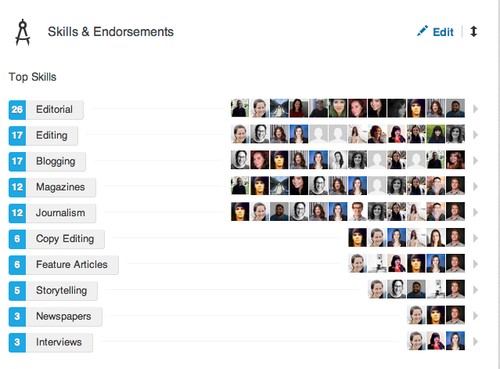
5. Endorse to be endorsed.Whether you think it’s just meaningless back-patting or not, having endorsements for certain skills on your profile makes you look impressive. “They are an additional signal that reaffirms your skills and areas of expertise for anyone viewing your profile,” Braswell said. Just look at this pyramid of stuff that it looks like I can do! (I’m actually illiterate). 
image
So if you have a past or present co-worker whom you respect and want to show some love, just take a moment to visit his profile. Usually there’ll be a button that encourages you to endorse him for something, anything. Odds are he’ll return the favor. At the very least, it’ll make your profile look fuller and more complete.

IP Camera Viewer 2.0 Final


IP Camera Viewer allows you to view live video from your USB or IP cameras on your PC. Use any USB or IP camera to keep an eye on your home, office, parking area or anywhere you need security. View video from multiple IP cameras directly to your computer. Currently more than 1500 different IP camera models from leading camera manufactures are supported. It includes Axis, Canon, D-Link, Foscam, Panasonic, Mobotix, Pixord, Sony, Toshiba, Vivotek and many more. You can send a request to our technical team if your camera or model is not listed in our application. Virtually all USB cameras work with IP Camera Viewer.

You can control and view up to 4 camera feeds simultaneously. Get a live preview from multiple cameras with this light-weight application. IP Camera Viewer's centralized camera and layout management allows you to view your cameras from multiple remote locations on a single screen. You can change the arrangement and preview layout of the cameras, for your security needs


key features

Live Previewing
· Control and view up to 4 camera feeds simultaneously.
· Use IP cameras as well as USB cams.
· Support for 1500 camera and counting.

Camera Configuration
· Digitally zoom, even if your camera does not support it.
· Pan/Tilt/Zoom (PTZ) support for many network cameras.
· Adjust the orientation of live feeds.

Advanced Camera Function Integration
· Adjust image settings for IP camera.
· Independently configure video and image properties for USB camera.
· Backup and Restore cameras with individual settings. 
http://download.cnet.com/IP-Camera-Viewer/3001-2348_4-75609217.html?hlndr=1

Google Chrome 36 update brings minor improvements


google updated its Chrome browser for Windows, Mac, and Android today. Most of the changes are under the hood, bringing stability and performance improvements.
For desktop users, you can look forward to 26 separate security updates. Linux users get a special Chrome App Launcher, which has been available for Windows and Mac for a while now.
For Android users, rendering pages has been improved on non-mobile optimized sites. This means sites without mobile specific enhancements will look a bit better. Google Doodles return to the new tab page so you won't miss out on obscure holidays.

How to update

Windows/Mac/Linux: With Chrome open, click on the menu (three slashes) and then About Google Chrome. Chrome should automatically detect the new update and install it for you. You'll need to relaunch your browser to finish the update.
Android: Head over to your Google Play app and tap on the menu button (top left) to bring out the navigation menu. Tap on My Apps to check for the update. Alternatively, you can download it from the links below.

Downloads

Watch Dogs PC full game (Torrent)

 
Games : Windows : Full Game : Multilanguage

About the game:

Watch Dogs is an action-adventure game played from a third-person perspective.
Players complete missions—linear scenarios with set objectives—to progress through the story.
Outside of missions, players can freely roam the open world of Chicago.
The game's combat utilises a combination of stealth components and parkour, along with the mechanics of a cover-based third-person shooter.
The hacking element of the game can also be used in combat situations to eliminate opponents, create diversions, or create cover.
It can also be used as a stealth tool to sneak past guards....


PC System Requirements
Minimum:

OS: Windows Vista (SP2), Windows 7 (SP1) or Windows 8 (Please note that we only support 64 bit OSs.)
Processor: Intel Core 2 Quad Q8400 @ 2.66Ghz or AMD Phenom II X4 940 @ 3.0Ghz
Memory: 4 GB RAM
Graphics: DirectX 11 graphics card with 1 GB Video RAM - Nvidia Geforce GTX 460 or AMD Radeon HD 5770
DirectX: Version 11
Hard Drive: 14 GB available space


Notes:
This version of game is already cracked and does NOT require Uplay - just install and play.
To change game language go to Options - Audio and Language.
Note some AV can give you a False Alarm about "Watch_Dogs.exe" - just add file to exceptions because is harmless.


How to install:
After download is done:
- open part1 (executable file) ,
- choose location ,
- click install ,
- wait until is done
- play game from desktop shortcut.
http://kickass.to/torrents/watch-dogs-pc-full-game-nosteam-t9147818/


If you like this game torrent seed it to others.
Enjoy .


image

image

image

Google's Project Zero to Scan Web for Security Flaws

 
Fear not, citizen: Google is looking out for you. 
Today (July 15) Google announced Project Zero, an in-house team of security researchers dedicated to finding flaws in non-Google software "across the Internet." Google says Project Zero will let the company more directly address zero-day flaws (newly discovered bugs) and other security issues in third-party software that affect Google users and Google products.
Among the members of Project Zero is George Hotz, a.k.a GeoHot, who was the first to carrier-unlock an iPhone in 2007 when he was 17, showed other how to hack a PlayStation 3 in 2010 (Sony sued him) and more recently found a Chrome OS exploit for which Google gave him a $150,000 reward -- and a job.
"Our objective is to significantly reduce the number of people harmed by targeted attacks," said Google security expert (and newly minted head of Project Zero) Chris Evans in a blog post. "We're hiring the best practically-minded security researchers and contributing 100 percent of their time toward improving security across the Internet." 
Google says it created Project Zero to improve Internet security for all Internet users. Others in the security industry are a bit more skeptical.
"Google's Project Zero amounts to little more than a PR stunt," said Aaron Portnoy, vice president of Exodus Intelligence, a security company that specializes in discovering zero-day vulnerabilities and disclosing them only to its clients.
"Bug-bounty programs, such as HP's Zero Day Initiative, have upwards of 1,500 researchers submitting vulnerability reports to their program," Portnoy told Tom's Guide, referring to funds that pay rewards to the finders of software flaws.
Portnoy, who once ran the Zero Day Initiative, pointed out that Google isn't the first major corporation to create an in-house team of researchers focused on finding flaws in software other than its own.
"Google adding 10 more researchers to the mix isn't really going to affect our business," he said.
Chaouki Bekrar of VUPEN, a French company that finds and sells zero-day security flaws, also weighed in.
"What Google did not understand is that killing a few zero-days will make Google's researchers/shareholders feel better but it will definitely not kill the market of zero-day exploits, instead it will make it even more lucrative," he told Tom's Guide.  
Evans says Project Zero's researchers will first report any flaws they find directly to the affected software's developers. Once the report becomes public (which Evans says is "typically once a patch is available") the bug will be filed in a public database (found here), where people can see how much time passed between a bug's reporting and its patching.
"We also commit to sending bug reports to vendors in as close to real-time as possible, and to working with them to get fixes to users in a reasonable time," Evans added. 
The other members of Project Zero include Ben Hawkes, Tavis Ormandy and Ian Beer, well-regarded Google employees with multiple bug discoveries to their names.

Google researchers have been finding security bugs in non-Google products for several years. Often, when researchers find a security flaw and report it to the company in question, the company will pay the researchers a "bug bounty" for their trouble — as Google did for Hotz's Chrome OS bug.
Some freelance researchers depend on these bug bounties for income. Project Zero's salaried researchers (and they're hiring, according to Evans) may cut into their business.

Android's 5 most annoying issues– will Google fix them?


Android is the most popular smartphone OS, and its development largely depends on Google. The company provides Stock Android to manufacturers, who then modify it for for different phones and tablets. (I'll be referring to the stock version of Android developed by Google in this article).
I asked our readers which Android issues bother them the most, and the 5 highlighted here are the most frequented complaints, along with the changes that Google could include in future versions of Android.

You can’t delete default apps

Each manufacturer adds its own apps, and there is no easy way to delete them. Comparing Android on Nexus devices to Samsung TouchWiz or HTC Sense is very different. While the core of Android is the same, third party manufacturers add extras to devices. Samsung, for example, adds a lot of Samsung-branded apps that you will probably never use.
In the latest versions of Android, these can be disabled, which stops them from running on you device. If you want to delete them, you have to root your device, which means to obtain administrator privileges.
Disable-app-android
You can’t delete some apps, only disable them (and only with Android 4.0+)
It’s not Google’s fault, but it’s true that Google could make it easier for its users to get administrator privileges without voiding the warranty. While this has its dangers, it would also allow them to control every aspect of the OS.

You can’t choose what to mute

If you mute your phone’s ringtone, you mute everything. When you place the phone on vibrate mode, it will vibrate for everything. You can’t choose, for example, if you only want to mute WhatsApp but not the ringtone. The sound settings will depend on each app or manufacturer.
Smart Volume
With SmartVolume you can change the volume of the ringtone and notifications separately
What can be controlled with apps like LightFlow or SmartVolume should become a permanent feature in future versions of Android. And let's not forget the Do not disturb feature, something missing in Android. You can, however, download third-party apps like Do Not Disturb.

You can’t control permissions for each individual app

In Android, you can’t control the permissions for each individual app. When you install a new app, Android informs you of the permissions it needs, which you must accept or reject altogether. You have no say on what you want and don’t want to allow. Yes, it’s easier, but it gives you less control over your device’s security.
AppOps
With AppOps you can decide what permissions to allow and which to deny for each app
Google unintentionally released a feature called AppOps to choose app permissions, but it was removed, stating that it was never meant for the general public and was meant for developers when testing apps. For now, you can only reactivate AppOps with unofficial apps.

The device runs out of space and the SD card features can be improved

The number of different Android devices with differing amounts of storage is overwhelming. Some phones have so little internal memory that after installing only four apps, you get the dreaded message ‘no space.’ This means you have to delete files or use utilities that move apps to the SD card.
FolderMount
FolderMount troubleshoots internal SD space, but you’ll have to root
I think the fact that Android doesn't let you move an app to the SD card and doesn't offer an accessible option to install all apps in the SD card by default is a serious issue. The answer to this conundrum lies in the variety of apps and Android phones: an option like this for all of them could generate problems, although it wouldn't cost anything to add an experimental option.
Having app data stored off of the installed storage can give you space back, but according to AndroidCentral, there was a big security risk with storing data on the SD card, a feature disabled in Android 4.4 KitKat.

There is still no native integration with the Desktop

One of the most popular apps for Android is AirDroid, which lets you use your phone from a browser, access your files, and do other similar tasks. Android doesn’t have any similar features. Another app that is becoming increasingly popular is Pushbullet, which lets you exchange files, links and notifications easily between phone and computer.
Pushbullet 
Pushbullet is a brilliant app to connect your device to your PC to exchange data
Again, Google leaves this in the hands of developers and manufacturers. There is no official suite, but rather  manufacturer apps like LG PC Suite. Google has the infrastructure to make something similar to Kies, AirDroid or Pushbullet though, so not everything is down to the manufacturers.

In the end it’s everyone’s and no one’s fault

When there is something wrong with an iPhone or Lumia, everyone knows who to blame: Apple or Microsoft. But if you have an Android and your battery doesn’t last very long, or if the browser is slow, things aren't as clear. Can you blame the device manufacturer? Google? The author of the app for not optimizing it for a thousand different phones?
While the Android world is fragmented with different devices, it’s difficult to tell if the problems are caused by Google, or the manufacturer. If Samsung adds useless applications to their phones, it’s not really Google’s fault. But at the same time, Google could add a feature to delete those apps.
If Google hasn't fixed these problems, it's because the solution would annoy and cause many problems for manufacturers and developers. Android, in this sense, has reached a point that can only be overcome with a forced unification. You can’t be everyone’s OS and keep everyone happy.

Windows 9 'Threshold' preview coming this fall


the next version of Windows, code named "Threshold," is expected to debut some time in 2015 but we'll get a preview this fall according to sources speaking with ZDNet.
Windows 8.1 focused on improving the desktop experience and Windows Threshold will continue the trend. Threshold will adapt to the type of hardware you're using. If it senses a mouse and keyboard, it will boot to the desktop by default. If you have a touch screen, it will boot to the live-tile interface.
Windows 8.1 already allows users to choose to boot to desktop by default, but Windows Threshold will automate the process.
We also saw a preview of the revised Start Menu coming to Threshold. It's a hybrid of the transitional Windows 7 Start Menu and Windows 8 live-tile interface.
Microsoft is also planning Windows 8.1 Update 2, which will provide minor usability improvements. This update is expected to roll out this August with a bunch of security updates.
There is still uncertainty whether Threshold will be an entirely new version of Windows or if it will be a point update. Microsoft may want to brand Threshold as Windows 9 to tempt users still clinging onto Windows 7. We've already seen evidence it will be named Windows 9 from a leaked image.

E3 2014: Assassin's Creed Unity - Ubisoft's real revolution?


Assassin's Creed is back. Will the game innovate and recapture lost and fading fans? From what I saw at E3, it could succeed and..then some.
We saw the main news around the game at Ubisoft's Conference, which we would then see firsthand at E3: as well as the long-awaited solo mode, there will be a co-op game with up to 4 players.
Assassin's Creed Unity introduces an important new feature that doesn’t significantly change the saga or the gameplay we're used to, but integrates into the game, enriching and giving life to the franchise that seemed to have lost its charm and vital energy since AC Black Flag.

The perfect setting for an assassin

Assassin's Creed is back, and this time it’s in a perfect setting, long awaited by fans: the French Revolution and the reign of terror. In Unity, we’ll start to see the power of next-gen with impressive graphics, film sequences and spectacular environments, populated by NPCS that interact with each other as real people.
In the mission that I saw, before killing our mark, we witnessed an execution by guillotine from the roof of a building in a square packed with people. After that, Arno falls on top of his victim, the assassination sequence perfectly imitating the brutality of the time.
In addition to the classic street life and watching passers-by from above, Assassin's Creed Unity explores the interior and the private life of the city for the first time. In the virtual Paris of the game, you can explore one in every four houses and inside you’ll find hidden characters, quests and treasures.
Unlike previous chapters, in which we had to wait until the next scene is loaded whenever we walked indoors, in Assassin's Creed Unity, entry into a building is smooth. In addition to houses, we can go down in the catacombs and the city’s sewerage system.

A return to murderous agility and renewed fighting

In the first chapters of the saga, I was impressed by the agility of Altair and Ezio when moving from one roof to another and climbing the walls of the buildings, but in the last releases, progress had stopped.
Assassin's Creed Unity proposes new movements, especially with regard to climbing along the walls, with Controlled Descent. Now Arno manages to exit elegantly, clinging to the walls and projections without following a predetermined path.
Even the fighting in Assassin's Creed Unity seems renewed compared to the fighting seen in earlier chapters, even though they look similar at first glance. The main feature concerns the counterattack, which won’t be as lethal as it often used to be.
Killing in fighting isn't as immediate, and as a result, the fight will be based more on the player's timing and pressing the right button at the right time. In the live demo that I saw, the fight seemed to be very different, even though it seemed more fluid and with better animations. We’ll really have to wait until a gameplay demo to see how much the gameplay has innovated.
In the single player mission of Assassin's Creed Unity shown at E3, I noticed how the stealth component of the game seemed rediscovered, with a brand new stealth system that lets you go unnoticed and seek cover behind objects more easily. From this point of view, is more the sense of being an assassin that skulking in the shadows.
To the delight of fans of AC, I also saw a kind of in-game map, thanks to which we can see goals and points of interest without having to pause and open the map. When you are high enough (for example on a roof of a building) and you are using Low Profile, these points will automatically appear on the screen.
Assassin's Creed Unity adds a mini RPG component to the game, thanks to which we can strengthen Arno gradually as we progress. In the demo we saw, for example, Eagle Vision lasted just a second or so, but over time we can build the duration up.

Coop Multiplayer: the real gem of Assassin's Creed Unity

The most eagerly awaited and substantial change to the Assassin's Creed saga is the online cooperative multiplayer, which involves all the game campaigns. In Unity, we can call friends to intervene in missions, with a max of 4 players simultaneously.
In the demo, we saw the people's assault on the Palace of the Marquis, the objective of the murderers’ mission. In the four screens, each character moved independently but had tools like the countdown timer to coordinate with others for synchronized action.

French Revolution or a murder revolution?

As seen at E3, it seems that Ubisoft has made enough changes to Assassin's Creed Unity to give continuity to a series that has appeared stranded over the last 2 installments. It’s managed to do this, however, without upsetting the soul of the game.
Fans of Assassin’s Creed will have in their hands a title that brings back the heart of the game, even at this early stage. The question is whether Unity will win back those who abandoned the saga because they found it too repetitive. The power of next-gen and the co-op mode, as well as the protagonist’s new moves seem sufficient evidence to at least give it a try, but we’ll have to wait until GamesCom to try the game first hand and let you know for sure!

How to install WhatsApp on your iPad or iPod touch


Contrary to popular belief, it's possible to install WhatsApp on an iPad or an iPod touch without resorting to a jailbreak.
With a little trick and a simple app,  I'll explain how you can install WhatsApp on your iPad or iPod, even without a SIM. The procedure takes no more than ten minutes, is simple, and works great.

What you need

In addition to your iPad or iPod touch, you'll also need:
  • a Mac or PC with iTunes
  • iFunBox, a file manager for Mac or PC that's used to manage the files on iOS devices
  • an iPhone (used only for a few minutes, you can even borrow your friend's if you don't have your own)
  • SIM (this will also serve just as a one-off and only for a few minutes)
The last item must be inserted in the iPhone to install and authorize WhatsApp on your mobile phone. Subsequently, this authorization will be "transferred" to the iPad, as I'll explain in the next steps.
Since, however, the same phone number can't be used for WhatsApp simultaneously on two devices, the idea is to use a SIM which isn't already tied to a WhatsApp account.

1. Download the app on your computer

Open iTunes on your Mac or PC and go to the iTunes Store. Find WhatsApp  for iPhone– there isn't a specific one for iPad– using the search field, and click on Free to download it.
Find WA in the Store
By doing this, the installation file (.IPA) will be downloaded to Music> iTunes> iTunes Media> Mobile Applications (on both Mac and PC).
The IPA file
For your convenience, drag it to the Desktop.

2. Install WhatsApp on your iPad

Download iFunBox (it's available for Mac and PC), open it and connect your iPad. Click on Install App.
iFunBox install app
Browse on your desktop, select the .IPA file, and install the app on your iPad. Disconnect it from your computer.

3. Authorize the app on an iPhone

Install a new version of WhatsApp on an iPhone, using a SIM card that isn't already linked to a WhatsApp account. If the app is already on your smartphone, delete it and re-install it. Before deleting it, though, back up your chats to iCloud (open WhatsApp, go to Settings> Chat> Backup chat and tap Backup Now). That way, you can restore them when the app re-installs.
If, for example, you have an old SIM card you no longer use, but which can still receive a text (the code to authorize the app will be sent via text message), or maybe a SIM card belonging to a relative or friend who doesn't use WhatsApp on that number, use that.
The SIM will only serve to activate the app. Then, it can continue to function as normal.
Open WhatsApp on your phone and proceed to register your number. Once you've entered the code, which you'll get via SMS, you can close the app.

4. The iPhone to iPad Transfer authorization

Disconnect your iPad from your computer and connect your iPhone. In iFunBox, choose User Application, find WhatsApp, and double click. Get the Documents and Library folders and drag them to the desktop.
Docs folder and Lib iPhone
Disconnect the iPhone, connect your iPad, select User Applications> Whatsapp again, open it with a double click, and drag the two folders that you took on your iPhone and "parked" on the desktop.
Subsequently, the iPhone (which contains the authorization), is replaced by the iPad or iPod touch.

5. Open WhatsApp on your iPad and start chatting

If you've carefully followed the above steps, WhatsApp should be fully operational on your iPad.
List Chat

WhatsApp without limits

Having WhatsApp on an iPad or iPod touch is nice and convenient. You can surf, chat, or work on the same device, and it's very easy to use.
In the case of the iPod, since you probably spend most of your time in places covered by WiFi networks, the Apple music player becomes a quasi-iPhone, even more so when WhatsApp will be able to accept voice calls.
If you want to transfer music files on WhatsApp on an iOS device, check out our tutorial on transferring MP3 files via WhatsApp.