Want To Delete Your Facebook Account? It’s Not As Easy As You Think


It’s more difficult than you think to delete your Facebook account, and Mashable’s social media reporter Kurt Wagner says you should think long and hard before clicking delete.
“People who have been on Facebook a long time forget how much information they really have in their profile,” he said. “A lot of it is information that you’d probably want to keep in some way shape or form.”
He recommends downloading a copy of your Facebook data which includes your photos, videos, and posts.
You should also turn off linked apps.
“What Facebook recommends is to reach out to these apps individually and request that they remove any data they’ve collected from you via Facebook”
And deletion is not the same as deactivation.
“Deactivation is kind of a cheaters way of quitting Facebook because in the back of your mind you always know that you can come back and restore your profile in the way that it existed before you jumped off.”
Facebook’s Data Use Policy says it takes about 30 days to delete your account, but some information may remain in backup copies for up to 90 days.

5 Simple Things You Can Do to Improve Your LinkedIn Profile


LinkedIn may seem like the saltine cracker of social media networks when compared to the celeb-saturated Twitter app or your gossipy Facebook feed. But when it comes to real-life payback, it could be just the thing to get you a brand-new, shiny job.
As easy as it is to neglect your LinkedIn profile, you should at the very least do a few basic things to keep it in fighting shape. Otherwise, you risk being passed over for opportunities that you might just be interested in — or even worse, missing out on important professional connections that might be helpful in the future.
Below, five simple ways to spruce up your page: 

1. Get a profile picture. A good one.No matter how qualified for a position you may be, no employer will be tempted to click on the generic outline of a human head that sits as a default for anyone who hasn’t bothered to upload a photo.
According to Crystal Braswell, manager of corporate communications at LinkedIn, adding a picture of your gorgeous face could result in 14 times more profile views than if you hadn’t. 
Alyssa Bereznak's LinkedIn profile
That being said, any old image won’t do. Don’t use a selfie, or anything shot using a cheap camera. And try to avoid the pixelated, obviously-cropped-out-of-a-group-photo portrait that’s so unfortunately common on Facebook. Choose a high-resolution image that’s just you, in a relatively conservative outfit, looking happy. Because people like working with other happy people.
If you don’t have a photo like this, ask a friend to take one. Some surveys have indicated that, for a sizable percentage of recruiters, it’s sometimes the only thing they look at.

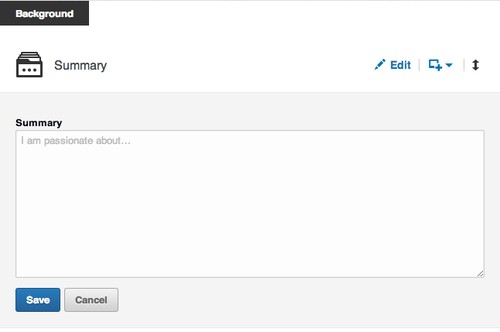
2. Write a summary.You may loathe writing self-summaries, but on LinkedIn, these little paragraphs can be particularly helpful for optimizing your searchability, according to Braswell. In other words, if a recruiter types in “advanced Swahili speaker” and it matches the keywords you put in your profile, you’ll automatically pop up on her results page. 
LinkedIn CEO Jeff Weiner concurs. “Your experiences, your skills, your ambitions, what it is you ultimately want to accomplish — that’s increasingly how people are finding you,” he told The New York Times’ Thomas Friedman in a recent interview. “For the vast majority of folks, when someone searches your name on a major search engine, your LinkedIn profile is showing up at or near the top of those results.” 
image
Don’t just reiterate the experience you’ve listed in each job. Use the summary, which should be at least 40 words to seem substantial, as a chance to make you seem like a well-rounded adult human and not some piece of recruiter meat. Braswell recommends discussing your life passions, interests, and goals.

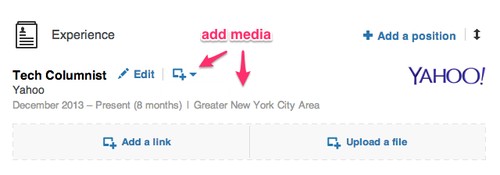
3. Add pretty graphics and videos.There’s a simple button that allows you to add some pizzazz to your otherwise-vanilla LinkedIn profile. Below your summary and each position, you have the option to add a link or a file. This is an opportunity to link to something awesome you worked on and load it into the site for everyone to see. You can also add videos, keynote presentations, or PDFs of research projects or papers.
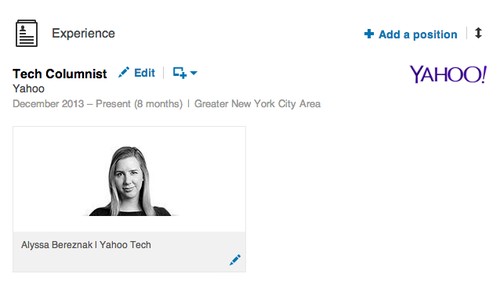
For instance, I added a link to my Yahoo Tech author page under my position, so anyone can browse my work.
image
And now it looks like this:
image
As Weiner told The New York Times, “the LinkedIn profile is now essentially your LinkedIn portfolio. Take a general contractor who previously would’ve been describing the dream house they just built. Now they can upload imagery or video.”
This feature is especially helpful if you happen to be in a creative industry that values your artistic or design skills. “Rich media becomes another way to visually differentiate yourself and show people exactly what you’re capable of,” Braswell told Yahoo Tech. “It presents a 3D view of you as a professional versus a two-dimensional view.”

4. Tell the world what a good person you are.In a survey conducted by LinkedIn, 42 percent of hiring managers said that they felt volunteer experience was pretty much the same as work experience. So if you’ve been helping design fliers for a friend’s nonprofit, or spending weekends at your local homeless shelter, make sure to mention it. The rest of us will find it in our hearts to forgive you for your humble bragging. 

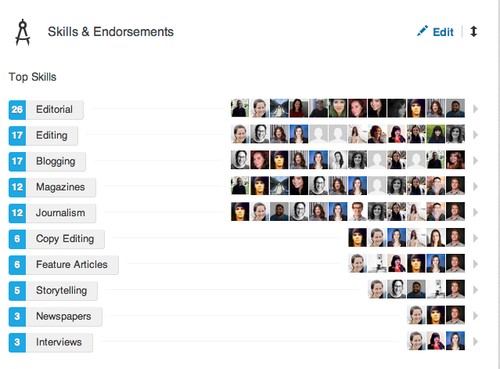
5. Endorse to be endorsed.Whether you think it’s just meaningless back-patting or not, having endorsements for certain skills on your profile makes you look impressive. “They are an additional signal that reaffirms your skills and areas of expertise for anyone viewing your profile,” Braswell said. Just look at this pyramid of stuff that it looks like I can do! (I’m actually illiterate). 
image
So if you have a past or present co-worker whom you respect and want to show some love, just take a moment to visit his profile. Usually there’ll be a button that encourages you to endorse him for something, anything. Odds are he’ll return the favor. At the very least, it’ll make your profile look fuller and more complete.

IP Camera Viewer 2.0 Final


IP Camera Viewer allows you to view live video from your USB or IP cameras on your PC. Use any USB or IP camera to keep an eye on your home, office, parking area or anywhere you need security. View video from multiple IP cameras directly to your computer. Currently more than 1500 different IP camera models from leading camera manufactures are supported. It includes Axis, Canon, D-Link, Foscam, Panasonic, Mobotix, Pixord, Sony, Toshiba, Vivotek and many more. You can send a request to our technical team if your camera or model is not listed in our application. Virtually all USB cameras work with IP Camera Viewer.

You can control and view up to 4 camera feeds simultaneously. Get a live preview from multiple cameras with this light-weight application. IP Camera Viewer's centralized camera and layout management allows you to view your cameras from multiple remote locations on a single screen. You can change the arrangement and preview layout of the cameras, for your security needs


key features

Live Previewing
· Control and view up to 4 camera feeds simultaneously.
· Use IP cameras as well as USB cams.
· Support for 1500 camera and counting.

Camera Configuration
· Digitally zoom, even if your camera does not support it.
· Pan/Tilt/Zoom (PTZ) support for many network cameras.
· Adjust the orientation of live feeds.

Advanced Camera Function Integration
· Adjust image settings for IP camera.
· Independently configure video and image properties for USB camera.
· Backup and Restore cameras with individual settings. 
http://download.cnet.com/IP-Camera-Viewer/3001-2348_4-75609217.html?hlndr=1

Resident Evil 7, GTA 5 for PC, Mass Effect 4: the games we can't wait to see at E3


E3, the world's largest video game expo, will take place in June, and we're bound to see brand new games, along with new installments of great sagas that we already know and love.

We asked our experts which games are likely be unveiled at E3 and which ones will steal the show.

Resident Evil 7, Fallout 4, Dishonored 2, Mass Effect 4 and Grand Theft Auto 5 for PC: discover why we're so excited about seeing them at E3 2014.
Daniel C. and Resident Evil 7: ‘I hope Albert Wesker makes a comeback’

 
I must be one of the few gamers in the universe who liked Resident Evil 6. It was entertaining, fun, long, and had lots of extra modes. That's why I really want to see Resident Evil 7 (multiplatform, please, I don’t have a PS4 or Xbox One). I hope it’s not a ‘back to the origins’ game as has been rumored for months. Fingers crossed!

I want to see heroes breaking huge boulders with their fists and villain Albert Wesker reborn from the ashes - even though they threw him into a pit of lava. I want to play unexpected stealth sequences or discover that a mysterious character is actually the clone of the protagonist’s twin brother. In short, I want Resident Evil 7 to have a sense of humor!


Who will make a comeback in Resident Evil 7?
Vincent and Fallout 4: "Bethesda, we've got faith!"

 
For me, Fallout 4 is THE GAME for E3. It's been on the cards for years (even before we saw Skyrim for the first time!), and it seems like Bethesda will finally unveil it at this E3.

If I can make a few guesses, I think we can expect a new game for new consoles and powerful PCs that will use a new version of the Skyrim or Rage engine, both very good for large settings. And while we’re on the topic, rumors also suggest that Fallout 4 will be set in Boston, although this hasn't been confirmed.

What we do know for sure is that after the brilliant Fallout: New Vegas by Obsidian Entertainment, we have high expectations. This could be a problem, seeing as how Fallout 4 is developed by Bethesda (who also did Fallout 3). This company has lots of experience in offering huge open worlds, but it seems incapable of crafting mature stories like the ones in the Fallout saga.


Will we go to Boston after New Vegas?
Daniel B and Dishonored 2: ‘I'm not into sequels, but I can make an exception’

 
Ever since I saw the first images from Dishonored, I knew I would fall in love with this game. The atmosphere in Dunwall with its permanent fog, steampunk flair and retro-futuristic technology are an example of how games can create new, totally captivating fantasy worlds.

Although I’m not really into sequels, I think that if they are made with passion, they can become great works of art, as good as the original games. That’s what I expect from Arcane Studios, who I hope will put together a Dishonored sequel set in a new world. I'll be looking for a vibrant story and improved graphics, and if they succeed, they’ll be one of the E3 sensations, without a doubt!


What's beyond Dunwall?
Jon and Mass Effect 4: ‘No reapers, please’

 
I sometimes think I'm the only person in the world who liked the ending of the Mass Effect trilogy. Yes, I admit that Mass Effect 3 had some flaws. The reaper attacks, for example, gave the game a speed that didn’t really match what you had to do, which was to take your time exploring and improving your skills. And I won't even mention the multiplayer options. Despite all this, however, Mass Effect is still my sci-fi and RPG favorite, thanks to great characters and a universe that’s big enough to tell other stories.

I don’t really like fantasy, so I've always stayed away from RPGs with dwarves and elves. That’s why I think the game works best when it doesn't make use of the reapers' apocalyptic plot, especially in the second game. I hope Mass Effect 4 doesn’t portray another threat to the human race, as we've seen enough of them. But, even if it does, I still can’t wait to see it!


How will Mass Effect 4 relate to the rest of the series?
Maria and GTA 5 for PC: ‘I can’t wait to install mods’

 
After that long-forgotten 2011 trailer, and many rumors that turned out to be true, GTA 5 arrived on our consoles in September 2013. It was incredibly successful, and it absolutely deserved the praise. Rockstar did it again and managed to leave us open-mouthed with a story that was as good as any HBO series, characters that could have been conceived by Scorsese, and fun and complex gameplay, the GTA trademark, often copied and seldom equaled.

If I enjoyed (and still do, thanks to the online version) GTA 5 on the console, why would I want to do play again on PC? Because I'm sure that in this new version, Rockstar will offer much more, from a significant graphic upgrade, to a more optimized online game through mods. Yes, I admit it. Installing mods for my favorite games, especially ones that are just plain crazy, is one of my greatest guilty pleasures.


Will GTA 5 for PC be a more complete version of the game?
What's your money on?

Well, these our the Softonic writers' favorites. But if your favorite isn’t among them, don’t worry. We’ll get to see many other games at E3 2014, from new releases of acclaimed franchises such as FIFA or PES, to new games like The Sims 4, Call of Duty and many more.

Touch Browser for Windows 8 with Chrome and Firefox tablet mode


Is Internet Explorer losing the advantage of its Windows 8 head-start? These days, Firefox and Chrome can also be used in a Modern UI-mode. However, unlike on the desktop, they're still significantly behind IE.
Chrome in Windows 8 Mode

With Google Chrome version 32, the touch version of Internet Explorer gets its first official competitor. Instead of selecting a tile, you start tablet mode by selecting an option in the browser menu.


When you click the option, a selection window for your installed web browsers opens. After clicking again, Google Chrome opens in Windows 8 mode.


By doing this, you also make Chrome your default browser. A downside of doing this is that the tablet version of Internet Explorer disappears from the Start menu and can no longer be opened. Unfortunately Microsoft doesn't allow an alternative - this means that if you want to use Internet Explorer again, you'll need to set it as the default browser. Fortunately, Internet Explorer automatically queries this next time you start your program.

Chrome's Windows 8 mode isn't very different from the desktop version. There are no finger-friendly buttons, no multi-touch gestures for zoom and navigation and Chrome for Windows 8 can't cope with the practical snap mode either. The browser is really only suitable for computers with a keyboard and mouse. You can still use the more versatile desktop version though.
Firefox in Windows 8 Mode

Firefox version 29 introduced a touch mode. To start Firefox in touch mode, you use the same principle as Google Chrome. A menu item allows you to set Firefox as the default browser. Then, when you start Firefox in future, it automatically loads the tablet-friendly interface.

However, unlike Google Chrome, Mozilla offers a browser that is genuinely optimized for tablets. Since our detailed analysis of the first test version, very little has been done to the interface. The design has been partially copied from Microsoft. As with IE11, you'll now find the address bar below and there are two large arrows to flip ahead and back, as well as new tabs.


Unlike Chrome, the controls are sufficiently large, there's a tab bar with thumbnails like in Internet Explorer, and Snap mode and touch gestures for the zoom work perfectly.
Further strengths of Internet Explorer vs. Chrome and Firefox for Windows 8

Firefox and Chrome on tablets are still no real alternative to Internet Explorer. In addition to the weaknesses already described, two practical functions of the Microsoft browser are missing.

In Touch mode, only Internet Explorer is able to offer simultaneous viewing of two pages with Windows Snap.


The handy Reading List App as a bookmark manager only works with Internet Explorer and a similar function is still missing from Chrome and Firefox Apps.


Anyone wishing to select and copy text will also be disappointed. There's no touch-friendly selection tool. Clearly, Google and Mozilla have more work to do if they want to give Microsoft on Windows Tablets a run for its money.

WinRar 5.0 - is it really better than 7-zip?


What are the benefits: RAR4 vs RAR5?

There are millions of RAR files in the world and most of them have been compressed with the algorithm RAR4, which can open almost all decompressors and almost all versions of WinRAR. WinRAR Version 5 introduces a higher standard, RAR5.

For starters, RAR5 increases the compression dictionary size to 1GB (in the 64-bit version). The larger the dictionary, which stores the repeatable parts of a file, the better the compression, but only for huge files.

The default size of the RAR compression dictionary is 32MB, a much lower figure. So when would you need to use large dictionary sizes? When you have huge files that you aren’t going to share, such as when you make a back up.

Another important change is the new recovery log. RAR5 format is much more resistant to damage than RAR4, but only with a log size equal or greater than 5% of the file, even if it’s corrupted.

Finally, with RAR5 you can encrypt your data with a 256-bit AES algorithm. It’s certainly not the strongest encryption on the market, but it is very, very robust. The U.S. government uses it to protect its Top Secret content.
Mini-comparison: RAR5 vs. 7-Zip vs. RAR4

In several tests, RAR5 has outperformed 7-Zip in terms of speed and compression ratio. For example, in a test published in Hyperspin, WinRAR 5 decompressed a 5GB image in two minutes compared to almost six minutes for 7-Zip.

We did a quick test comparing RAR5, RAR4 and 7-Zip (LZMA and LZMA2). The machine used was a Dell Precision Workstation 490 with CPU Intel Xeon 5130 (dual-processor quad-core), 16GB of RAM and Windows 8 Pro 64bit.

The file contained 104 different file types (documents, videos, images and uncompressed music) in ten folders, occupying a total area of 528.031.744 bytes in the NTFS partition. Source and destination were the same ATA hard drive.


Three default options were used: fastest, most powerful and normal. The only thing that changed was the size of the dictionaries to match, as far as possible, those used by RAR5 (apart from RAR4, which was limited to 4mb).

Starting with the obvious: RAR algorithm speed is impressive both in RAR4 andRAR5. Bear in mind that the normal RAR5 level uses 32MB dictionaries, which increased compression times considerably.

7-Zip results weren’t great. In the case of LZMA, which is the algorithm 7-Zip uses by default, the CPU is hardly used, whereas LZMA2 doesn’t have this limitation. But even using eight multithreaded cores couldn’t beat RAR4.

The results of compression, which can be tentatively drawn from the sample used, show some advantage to using RAR over 7-Zip, but they’re not very significant.
Can RAR5 be used now?

Absolutely. To do this you have to choose the option RAR5 to compress a new file from WinRAR 5.0. The default dictionary size is 32 megabytes.
Why can’t I unzip RAR5?

Files compressed with the algorithm RAR5 are still very new and, can only be opened by WinRAR 5. We tested several of the most popular decompressors, such as 7-Zip and IZArc, and we haven’t managed to open RAR5 files.


Although RAR isn’t an open source format, WinRAR distributes the source code of the UnRAR utility, which is free and only for command lines. On the same page the RAR5 format specifications are available.

Whether other decompressors will open RAR5 files depends on how fast they adopt the new standard. In the case of 7-Zip, Igor Pavlov, the lead developer, has said that adding support for RAR5 “isn’t a priority”.
What version of RAR should you use?

Right now, for compatibility reasons, our recommendation is to use RAR4, which WinRAR offers by default. To share RAR5 files it’s best to wait until the format gets a bit more popular, or create a self-extracting file.
Which compression format are you going to use?

Call of Duty: Ghosts Review


A bleak scenario


In a context of global economic crisis, several oil-producing South American countries combine to form the Federation, a new superpower that will benefit from its hegemonic position to turn against, as I’m sure you’ve already guessed, the United States. The single player campaign of Call of Duty: Ghosts begins the moment the Federation takes control of an American space station and launches a large-scale orbital attack on the United States.

Call of Duty: Ghosts awkwardly attempts to tug on your heart strings by telling the story of two brothers and their German Shepherd who, almost through no fault of their own, take part in reconquering their native land. No, this year, it will no longer be the single player campaign that will inspire people to buy Call of Duty: Ghosts.
One for thrill seekers... on rails


The heroes can count on Riley, their German Shepherd.

Like its illustrious predecessors, the single player campaign of Call of Duty: Ghosts takes it cues from blockbuster movies, throwing us straight into the action from the first minutes of play. It explodes in all directions where bullets abound and blood spurts, creating genuine entertainment for thrill seekers. The only problem, is that it's mounted on its rails.

There's no time to improvise. The single player campaign leaves very little room for interaction, which is the last thing you want in a video game. The player basically has to follow, more or less quickly, the orders that appear on screen, which have been given by the other characters.

I was surprised to find that level gameplay was a vague system of checkpoints and objectives that weren't always very clear. Small flaws were compensated for by the linear aspect of the traditional corridor levels that we expect from this series.

But not everything has been thrown into the single player campaign in Call of Duty: Ghosts. Our two brothers in arms will always be able to count on Riley, their dog, in brief phases of gameplay that showcase stealth. Unfortunately, you’re not actually able to control their four legged friend at any point, what surely seems like a missed opportunity.
Multiplayer: (almost) all quiet on the Western Front...


The new customization system offers nearly 20,000 different possibilities.

Trigger-happy junkies can rest assured, Call of Duty: Ghosts hasn't changed - or at least has barely changed - its celebrated multiplayer mode! The new features include 14 new maps, the ability to slide along the ground, a new customization system offering nearly 20,000 different possibilities, female avatars, 7 new game modes, and 20 new Killstreaks (bonuses that reward a certain number of enemies killed in succession), including the dogs of war!

As is common in the series, Call of Duty: Ghosts doesn't really leave room for tactics, and it’s the reflexes, memorization, and attitude of the players that will reap the rewards.

The new Squad Points system allows all players, in theory, to customize their characters and adapt their equipment to their type of game play. Unfortunately, you need to play lots of matches online before you can raise the amount of points required to purchase better weapons and accessories.

The system isn't particularly easy and could put off less patient players or newcomers to the game. Fortunately, beginners will have Squad mode to become familiar with the mechanics of the multi-player game and the chance to win Squad Points before coming up against hordes of bloodthirsty players.

These are subtle changes that hopefully won't turn fans away from the genre.
Extinction: the diamond in the rough


In Extinction, you have to try and repel an alien invasion.

The real surprise of Call of Duty: Ghosts comes in the form of Extinction, a fabulous multiplayer co-op mode that’s fun, refreshing and full of great ideas. In Horde moderevisited, you attempt to repel an alien invasion along with 3 other players. Your main objective is to fight successive waves of enemies and destroy the hives of the invader with limited resources.

There's also no more mindless shooting found in the single player campaign. In Extinctionmode, you'll need to buy your weapons and ammunition with money earned by completing the game objectives and shooting down aliens; it's a crucial detail which adds a dimension of both strategy and invigorating survival to the mode.

There's also the new system of exciting challenges, the terrible environmental traps (gas cylinders, electrified areas, and controlled fires) and the techniques involved in mastering aerobatics. In truth, Extinction is single-handidly good enough to justify purchasing Call of Duty: Ghosts, a real demonstration of the creative potential of Infinity Ward studio.
Visible strings


Call of Duty: Ghosts doesn't shown its full potential on the current generation of consoles.

I tested Call of Duty: Ghosts on the Playstation 3 and I have to admit that I wasn’t particularly impressed with the graphics of the game. Between low-resolution texturesand frozen facial animations, Call of Duty: Ghosts doesn't show its full potential on current generation consoles. Fortunately, great particle effects, deformation of the maps, and the animations of Riley come together to improve a package that isn't particularly showy.
Verdict: spectral pallor


With Call of Duty: Ghosts, Infinity Ward delivers a collection of disjointed experiences with mixed quality. The multiplayer mode, the major asset of the series, has been enhanced with subtle improvements that perfect an already proven game mechanic without taking enough risks to permanently draw attention to them. But if Call of Duty: Ghosts remains, despite everything, a good action game, it'll be interesting to see how the Activision title will fare against a new generation of first-person shooters like the ambitious Titanfall andDestiny.

Despite a mixed critical reception, Moonraker remains one of the most successful movies in the James Bond franchise. With a billion dollar revenue on its first day of release, it's likely that Call of Duty: Ghosts will share a similar fate.
Score: 7.5/10


Call of Duty: Ghosts is available on PC, PlayStation 3, PlayStation 4, Xbox 360, and Xbox One.

Set up your Windows PC as a wireless hotspot


1. Check if your network driver supports hosted networks

On individual computers, Virtual Router Plus can't access the local network. The driver for your network card must support hosted networks. You check if this is the case in two simple steps.
Press the Windows key and R. Type CMD in the character field Open and click OK.

A window appears with the Windows command line. Enter the command netsh wlan show drivers and press Enter or Return. Windows then lists details of your network drivers. If at Supported Hosted Networks the entry is Yes, then you can set up a wifi hotspot.


2. If your PC has no wireless adapter: Buy a USB wireless adapter and connect it:

You can buy a USB Wireless LAN adapter online for less than five dollars. Insert the adapter into an available USB port and you're ready to go. Drivers are unnecessary in most cases - Windows automatically detects the device.

3. Install Virtual Router Plus

Download Virtual Router Plus and install the program.
4. Starting and adjusting Virtual Router Plus

The freeware requires only three simple pieces of information: Under Network Name (SSID), enter a name. Then enter a secure password (as secure as possible) and choose your internet connection for Shared Connection. Click on Start Virtual Router to activate your personal Wi-Fi hotspot.

5. Connect the mobile device

Your Windows Wi-Fi hotspot now shows as an available network on your mobile device. After entering the password, you can use the internet connection from your PC on your tablet, laptop, or smartphone.


Image: Private screenshot via Placeit

Troubleshooting: Hotspot cannot be found

If your mobile device can't find the Wi-Fi hotspot, click on Stop Virtual Router in Virtual Router Manager, and then on Start Virtual Router again. Use this method to solve any connection problems, but we're fairly confident you won't have any.
Have you tried this method of creating a Wi-Fi hotspot? Did it work?

Exclusive: IObit releases Advanced SystemCare Ultimate


Advanced SystemCare Ultimate from IObit is out today. Today we have an exclusive look at this security and maintenance suite, which will be replacing Advanced SystemCare with Antivirus as IObit's premiere SystemCare suite.

There are a ton of features in Advanced SystemCare Ultimate that will help take all of the thinking and work out of protecting and maintaining your computer. Some maintenance suites are complicated and intimidating to less tech savvy users but Advanced SystemCare Ultimate is simple enough for the novice, yet powerful enough for the power user.

Google’s Voter Information Tool offers US election facts


Google’s Voter Information Tool offers US election facts


The US election is tomorrow. In a past blog post, I provided an offering of tools that could help you keep up with where each presidential candidate stood on the issues that matter most to Americans.

Android 4.2 vs iOS 6 vs Windows Phone 8


Android 4.2 vs iOS 6 vs Windows Phone 8


When I previously compared Android 4.1, iOS 6, and Windows Phone 8, none of the operating systems were publicly released. Last week Microsoft launched Windows Phone 8 and Google revealed the next incremental. update to Android, version 4.2

Android and Windows Phone 8 have planned mid-November releases in the United States. Google will release Nexus devices with Android 4.2 and Microsoft’s manufacturing partners will release Windows Phone 8. It’s still unknown if people will move to Windows Phone 8 because of the new hardware requirements and the lack of information about Windows Phone 7.8's release.

iOS 6 was released on September 19 and saw rapid adoption, but suffered consumer backlash for Apple Maps and the removal of YouTube. Apple publicly apologized for Apple Maps, but users are still waiting for Google to release a standalone Google Maps app.

The big three are going head to head again with official releases so how do they compare?


Interface

It was interesting to see Microsoft take a jab at Android during their Windows Phone 8 launch event. Windows Phone 8 improves on Windows Phone 7 by allowing users to further customize the home screen.

While I applaud Microsoft allowing users this massive level of customization, it’s actually pretty basic. The Live Tile idea makes the interface interesting because allows users to quickly view important information. The Windows Phone 8 interface is just another way to present information, as Android has widgets that do much the same.

As opposed to setting apps on specific grids, Windows Phone 8 is a consistently scrolling set of boxes. How does this apply to the user who prefers a very simple screen with minimal icons? Windows Phone 8 won’t work for them because the interface is focused on providing lots of tiles with information.


Stock Android 4.2 doesn’t change anything visually but include internal improvements. Android still offers an excellent amount of customization while offering an easy to use interface. If you don’t like the stock experience, the Google Play store also features a lot of launchers that can replace the stock one.

iOS 6 changed nothing about its interface, which can be good and bad. If you picked up the new iPhone 5, you were given another row on your screen for more icons or folders. The interface in iOS hasn’t changed much since its release and there isn’t any expected change.
Features

Windows Phone 8 offers a lot of interesting features what are comparable to other operating systems. The ecosystem that Microsoft is trying to present sounds excellent because it bridges Windows Phone 8 users together while allowing non-Windows Phone 8 users to participate. In the launch event, VP Joe Belfiore directly mentioned iPhone users would be able to see shared calendars.


Data Sense is a lot like Android’s Data Usage setting. It monitors how much data is used and adds Wi-Fi hotspot search. Microsoft’s claim that it will compress webpages for more site browsing is only a slight bonus because most data usage comes from apps apps. It’s nice of Microsoft to condense the amount of data used on mobile browsers, but I can’t see people browsing site to site once app developers release their native apps for Windows Phone.


Kid’s Corner is an interesting addition because it creates a sub-user account for kids on the device. It’s a great way for parents to control the usage of their device, but it's more likely that the majority of users will only have one user.

The Android 4.2 update adds more function to Google Now, which is available for anyone running Jelly Bean (Android 4.1). It adds Gmail scanning for flight info and package tracking as new cards. Google plans on continuously adding more cards for Google Now.


Another big feature added to Android 4.2 is the use of Knowledge Graph to provide better answers to searches. In terms of search, Android’s link to Google Search has been good, but Knowledge Graph will help improve the quality of results. Smaller updates include tablet-only multiple account support, gesture typing, and more functionality with notifications which don’t dramatically change the experience on Android.


iOS 6 hasn’t really shown the usefulness of the apps that Apple was proud to announce. Maps is still a work-in-progress and Passbook doesn't have many supporting apps. Siri received an update for more accurate results and you can use voice to post to Facebook, but there wasn’t anything drastically different. The latest OS does allow you to share photos in your Photo Stream and iCloud, but the cloud backup service isn’t transparent for most users.
Supporting the Cloud

Microsoft is pushing Skydrive integration with Windows Phone 8 and Windows 8. Content is automatically uploaded to Skydrive allowing you to access it through a browser. It’s great to see Microsoft starting to use Skydrive as a service bridging Windows Phone 8 and Windows 8. The auto uploads will help photophiles a lot and the ability to create and edit documents in Office 2013 will be a benefit for users. Skydrive offers 7 GB of free storage, but still hasn’t defined exactly how well Skydrive will work between devices. Microsoft is really starting its push towards more a more seamless ecosystem for first party services.

Though Microsoft is pushing Skydrive as the best cloud-based system, Android has been cementing itself in cloud productivity with Google Drive for years. The focus on cloud syncing in Android makes it possible to easily switch from device to device with the same account and still have all your info and files. You can use the different productivity apps in Google Drive and see the updates push to the webapp with almost no delay. Android’s cloud service is built into the majority of its apps.


Apple’s cloud presence is a lot more minimal. There isn’t much cloud productivity inside any of the first party Apple apps because you have to buy the various iWork apps on both iOS and OS X. Google offers Google Drive apps for free, but syncing between Apple devices requires you to buy multiple versions of the same program on different devices. iCloud backups on iOS devices is still very convoluted. You can choose which app data to backup to iCloud, but all apps are set to backup by default which can fill your storage quickly.

Having data backups for certain apps is great like game data or user settings, but the 5 GB that Apple offers feels very small even compared to the same amount of space that Google offers. Apple claims having easy backup solutions, but there are issues with what Apple decides what will or will not count against the 5GB of storage. If you have a lot of apps, those 5 GB could be filled quickly without you even realizing it.
Who's winning now?

Windows Phone 8 has the most to prove among the three operating systems. Since the device and OS is an entire step forward from Windows Phone 7.5 because it requires new hardware to experience, Microsoft has to sell the usefulness of the device and the connectivity between Windows 8 and Windows Phone 8.

Android 4.2's small update adds smaller features and functionality. If you use a lot of Google services, 4.2 will improve your Android experience. Tablet users will enjoy the ability to create multiple accounts, but there hasn’t been a good demo of this yet. Google is still leading on the cloud productivity front and it looks like they’re going to stay that way for the moment.

iOS 6 isn’t the jump forward like Apple claimed. It felt more like a smaller update to improve features already on the device. Apple Maps’ beta status at launch didn’t help much with the perception of iOS 6, but Apple is working hard on improving the experience. Google could still steal users away from Apple with its superior Google Maps app, but since it’s impossible to change the default apps in iOS, Apple will still maintain control.

Each operating system offers something for each different kind of user. Android is still the best for people who enjoy customization and iOS is great for those who are used to the experience. It’s Windows Phone 8 that needs to prove itself. Releasing alongside Windows 8 and highlighting the connectivity between each OS, Microsoft has an uphill battle convincing users to switch from Android or iOS.

There isn’t a clear “best” OS because they speak to different users. But Windows Phone 8 could be the change that people tired of Android and iOS are looking for.